
The first note I’ll add here on offer code purchasing is as follows:
For anyone curious about the flow of redeeming an offer code via the redemption URL, after a successful purchase, the flow presents the user with a CTA linking them back to your app.
This note above is an unknown when testing in StoreKit as we do not have access to testing the offer code redemption URL until your app is in production. In StoreKit testing we only have access to testing using the sheet pre-populated with the offers.
Using local StoreKit configuration for testing and “Manage Transaction” in Xcode to make purchases
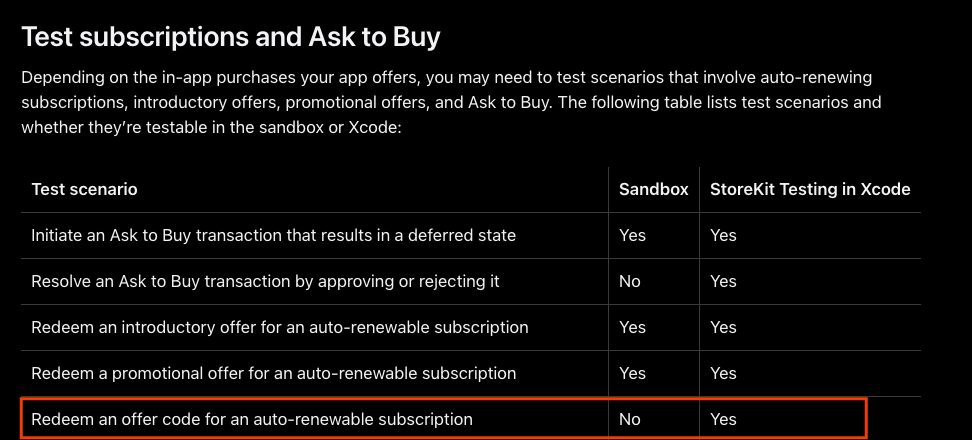
Offer code testing is not supported in Sandbox. In Apple’s documentation and as seen in the screenshot below, StoreKit testing is supported.
Using Manage Transactions to view your purchases in Xcode while using StoreKit testing:
- Navigate to Product >> StoreKit in Xcode >> Manage Transaction.
- Use your local StoreKit configuration file via “Edit Scheme” to generate in-app purchase products.
- Make a purchase using the simulator.
- You will now be able to view and edit your transactions.
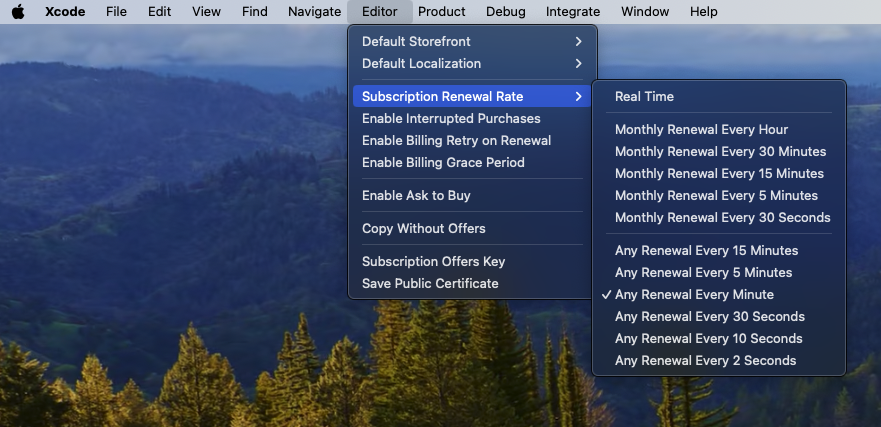
Editing the subscription renewal rate which comes in very handy to view your subscription cadence:
- Navigate to your StoreKit configuration file.
- Navigate to Editor >> Subscription Renewal Rate (The default is real-time).
 alexpaul.dev